More Than Great Looking, User-Friendly & Easy To Maintain – For Anyone!
“Anyone can publish a website. With One Sky Media, you get a race track communication machine!”
Built on the WordPress Content Management Platform
We build our track websites using WordPress, the most popular open-source platform currently supporting more than 44% of ALL websites worldwide and more than 64% of those using a Content Management System. Put simply, it’s the best platform available.


Custom Track Event Schedule
Have you been disappointed with how your race tracks website handles event scheduling & promotion details? We have!
We’ve developed a custom scheduling app that automatically promotes upcoming events to the home page of your track website in three ways:
- Each event can have important notices as needed. Notifications render at the top of the page by simply entering the message in a predefined field and selecting a background color from a dropdown. For example, if an event is canceled, a message can appear at the top in red. Other notices can be in your choice of yellow, green, or black, depending on the message’s importance. The yellow stripe in the example image below contains a less critical message; it renders in yellow.
Top of Home Page – Notification View
- Upcoming events ALWAYS display above the fold on PCs and immediately after the header on phones, shown in order by date. The next event renders on the left, the second-to-next in the middle, and the third-to-next on the right.
Top of Home Page – Next Three Events View
- Select any event as a “Featured Event” on any upcoming date, and it will automatically render immediately following the Next 3 Events. Featured Events display the event name, promoter, description, and photos or artwork, including flyers. Choose multiple events and they will display in chronological order. See the example below.
Home Page – Featured Events Display


Built-in Automation Makes our Event Schedule Handler a Candidate For Employee of The Year
We hear it all the time: good help is hard to find. Your track website can be the best employee you have. Once the schedule of events is loaded, the website automatically:
- Continuously renders the following three events at the top of the home page.
- Removes the expired event from the home page display just after midnight on the final day of the event
- Installs the next event on the schedule in the rightmost position and slides the other two events to the leftmost and center spots.
- Removes just passed events from the active schedule page and moves them to the events archive page.
This same sequencing also applies to the events selected as Featured events, keeping the website up to date and showing visitors the essential information front and center.
Events Schedule – Monthly View
Event Schedule – Detailed View
Time Critical Event Notifications – Communicate Now!
Some messages are time-critical. The most important at a given moment. They take precedence over all others. How do you effectively communicate a cancellation? A schedule change? With our Event Handlers integrated event notification, it’s simple to post event-critical messages right at the top of every page of your website. Choose your color from Red (see an example of Red in the image below), Green, Yellow, or Black, and type your message. Your message automatically displays at the top of every page. It automatically links directly to the related event page, where you can add any relevant details. Event canceled? Will it be rescheduled? Time changed? Explain!
Urgent messages can be set to grab visitors’ attention by flashing “NOTIFICATION” just above the “View Details” button for each of the teasers shown at the top of the page by simply checking a box on the event’s details page.
Your notification will remain at the top of your website until 12:01 AM on the day after the event! Your website’s automation will automatically remove it from the top of every page, while your explanation will remain archived with the event details.
Example of an Important Notification in Urgent Red (displays on every page). Return to Top
Example of an Important Notification in Attention-Grabbing Green (displays on every page). Return to Top
Example of flashing “Notification” message above the “View Details” button on the left-most event teaser.

Simple activation of flashing “Notification” message above the “View Details” button on teasers.

Automated Two-Tier Sponsor Carousel provides Maximum Exposure for Sponsors.
Three of the most critical elements to a successful race track are race-able weather—good turnout by racers and, for some events, spectators. And last but not least, track and event sponsors.
Track and race promoters can influence attendance. Sponsors arrive and stay when they gain a positive return on their investment! Only the big guy above can control the weather.
Your website is a popular destination for both racers and fans. It hosts tens of thousands of visitors per month and more in peak season. One Sky Media Webmasters Track websites feature an automated sponsor carousel on every website page, maximizing exposure for your sponsors.
As visitors scroll down the home page, the sponsor carousel automatically appears at the bottom of the screen and always remains visible.
On the inside pages, the carousel is always present, permanently attached to the base of the screen.
Each logo links directly to the sponsor’s website and opens in a new browser tab, preserving your site once the sponsor site visit is completed. If a sponsor has no website, you can add a page to your tracks site with their details and contact information, another value add! All of this is edited using One Sky Media’s WordPress custom post system, which facilitates the simple addition or removal of sponsors by any staff member without prior website editing experience.
Track sponsor logos are always on-screen — on desktop machines, phones, and PADs.
Separate sponsors into two groups. Premier sponsors always render at the beginning of the scroll. In contrast, others will follow the premium ones, constantly changing the random order of presentation to ensure each one receives equal exposure. This feature allows you to offer added value and exposure to your higher-level sponsors while still offering excellent exposure for all.

Featured Racers Page – Give the Nod to Those That Support Your Track
Racers love exposure. Many are faithful to your facility as their “Home Track.” Here is a simple way to recognize your racers in a lasting way. One Sky Media Track websites offer a Featured Racer section with a custom-built form that allows racers to submit the details of their own story, including their profile & photos. This feature relieves a track employee of the burden of gathering the information needed to post a new racer each month, or at whatever frequency is desired. A simple announcement over the track’s PA system will prompt stories to flow in.
This feature is not only a small payback to your racers; it keeps your website content ever-fresh.
Racer View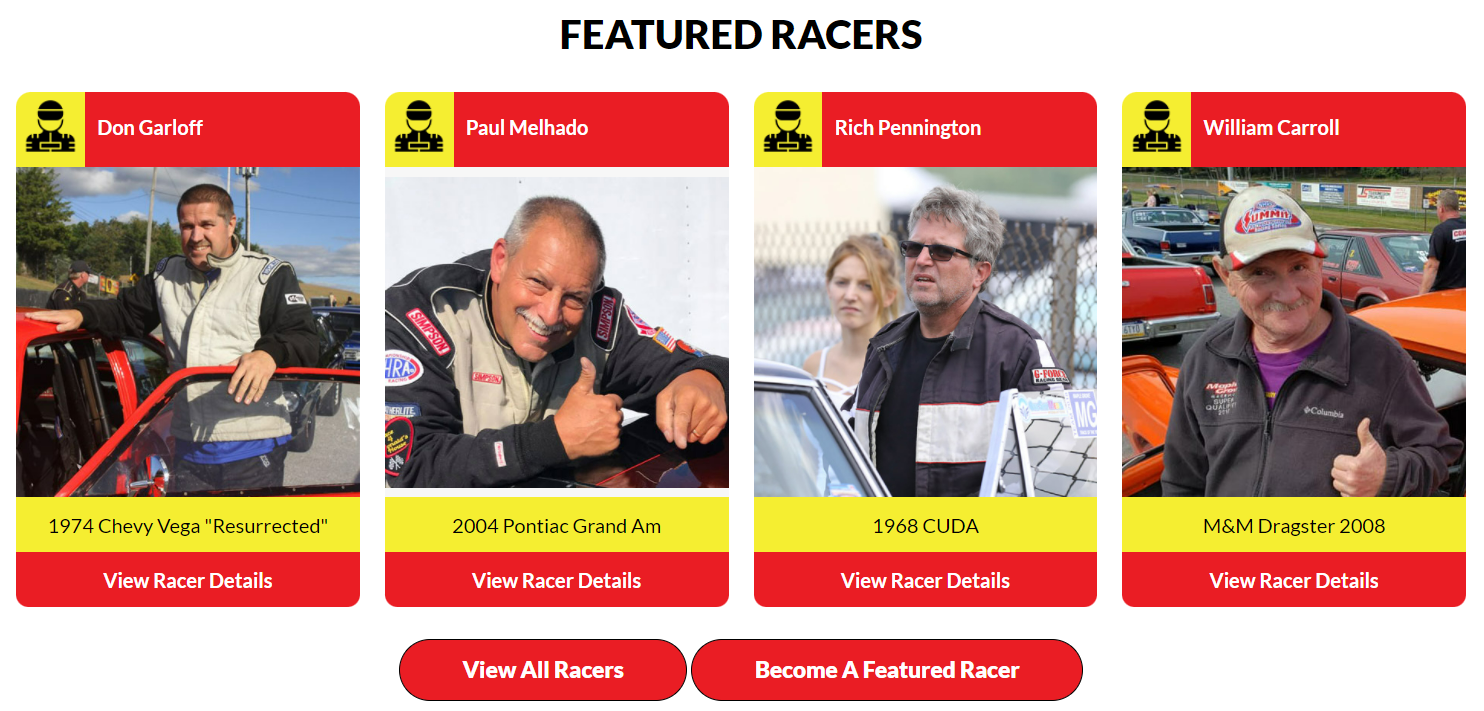
Submission Form

Integrated Ticket Sales
Do you have events and races that need advanced ticket sales? Are you tired of paying a third party to handle this for you? We can integrate ticket sales for you:
- Sell any number of tickets.
- Automate the sale’s start date and time.
- Automatically remove the event for purchase immediately once the predefined number of tickets has been sold.
The sale will automatically begin at the prescribed time and end once the predefined volume has been sold.
Custom Points Posting System
Our websites have an integrated Points Posting System to simplify updating your weekly points standings. If you can send emails, you can update your weekly points! Just create a PDF containing the current standings and upload it via our custom interface, easily accessible on the backend of your website.


Perfectly Mobile Responsive
Our sites are perfectly mobile responsive—They work 100% and are excellently viewable on phones, desktop PCs, Laptop PCs, and tablets.
Click here to see one of our track websites on popular mobile devices.
Visit a Few of Our Clients Track Websites


How does your drag strip website serve your racing fans and racers? Contact us, and let’s discuss building one of the best Race Track websites for your track.